Labs Overview
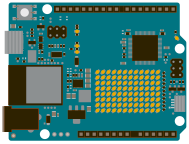
In the COGS 300 Labs, you will be using the Arduino development platform. Arduino is a widely-adopted and mature internet-of-things (IoT) prototyping board. We will be using the Arduino Uno R4 Wifi for this course. See the documentation for the Uno R4 Wifi for a description of pinouts, tutorials, example code, and more.
Journey from zero to robot
The labs will progress you from learning basic circuits to making an autonomous robot that will compete in a final tournament. The tournament will be an obstacle course where your robot must autonomously navigate through two mazes and find a goal. Winner of the tournament will be the robot with the goal-finding time.
Many people starting COGS 300 balk at the idea that they can build a robot. They may not consider themselves engineers, believe they are bad at coding, are no good at math, etc. Our experience is that everyone (yes, even you!) can indeed learn to build and program a robot by the end of the course. Many people from the Arts are surprised at how well they can do! I have heard many times during office hours how someone can't believe they built a robot. It will happen for you, too, if you put in the time.
Coding and Circuit Building
This course will mainly use the Arduino IDE, which uses C++. You do not need to be experienced at C++ programming to start the course, but you will want to become familiar with the basics of reading and writing C++ if you have come from another language (like Racket or Python). Since this is not a coding course, we will be giving only limited instruction in C++ (however, we will provide many working code examples).
You will also need some method of communicating between the Arduino and your computer. You can use the Processing.org IDE, a Java-based IDE that looks and feels very similar to Arduino. We will also use pre-written examples, available on the COGS 300 GitHub page.
For those who want to engage at a more advanced level, you are welcome to use any machine learning (ML) framework that you want to guide your robot. We will teach only a limited version of ML in the class so that it is possible for beginners to feel confident. However, you are encouraged to use any ML resources and build the most intelligent robot you can.
Marking and Structure
Each lab has preparatory work that you should do ahead of time called the "pre-lab". There will usually be some video content, some coding content, and some conceptual content. The pre-labs are not marked, but they are highly recommended to have a good experience in your lab.
During the lab, you will have tasks that you need to complete and show your TA. They are designed to be challenging enough to keep you focused during lab, but not so challenging that you cannot complete them. If you are having difficulty completing them, that's a perfect time to ask for a lot of help from the TA. In this course, your TA is there to help you, not to test your knowledge. All questions are encouraged.
At some point during the lab, the TA will visit your group and ask you to show you the creative work from the previous lab. At this time, they will also go through a post-mortem with you. It is important that you take the post-mortem seriously and be honest during them. There will be some critique, but more importantly, it is a time to talk about difficulties working during the week, and to debug problems both with your robots and your group working structure. Everyone will be required to:
- Say one thing that worked well about working together this week.
- Say one thing that you, personally, accomplished with regards to your group work.
- Say one thing that did not work well about working together this week.
This is designed to get you talking about problems early and often. Nobody is allowed to not talk, everybody has to say one thing positive—and negative. No system is perfect; even if the week went really well, that's the perfect time to practice saying difficult things.
After the lab, you will have homework that you need to complete before the next lab. Usually, there will be a creative component, i.e., you'll need to do something that is beyond the minimum stated requirements to get full marks. Students sometimes find this ambiguity to be difficult. The point of this is not to make your life stressful or to have an unobtainable high bar, but simply to show that you have understood the lab work enough to extend what you've learned into new areas. Usually, when students run their ideas by me, most people's first creative ideas are wonderful and good enough to get full marks easily.
- 5: Exceptional demonstration of lab concepts (exceeds requirements)
- 4: Good demonstration of lab concepts (meets requirements)
- 3: Reasonable demonstration of lab concepts (one or two requirements unclear)
- 2: Missing one or two lab concepts
- 1: Missing most lab concepts
- 0: No attendance/no completion
Attendance
Attendance at labs is mandatory. If there is a very exceptional instance where you cannot attend, you must inform your TA and group members well ahead of the lab so that alternate plans can be made. This applies to group meetings and outside of class communication as well. You are required to be reachable, communicative, and present.
We do not especially require doctor's notes, unless there starts to be an ongoing issue. Then, you should apply for academic concessions through your faculty and contact COGS advising.
Materials
Some materials are provided, and some materials you will be required to purchase. Our local electronics store, Lee's is our preferred provider (i.e., we ask them to stock materials), but they are not the cheapest. Cheap is not always better: buyer beware.
Purchase these yourself
1 x Arduino Uno R4 Wifi (included in Lab Kit)
We only officially support the Arduino Uno R4 Wifi. You can use other, similar, cheaper boards at your own risk. Course staff will not help you debug problems that are unique to a knockoff board.
The Arduino Uno R4 Wifi was chosen because:
- It allows for wireless communication between boards and computers
- It balances price and quality, so that we do not spend unnecessary time debugging
- It is designed to be very beginner-friendly and widely available (i.e., vs. a Raspberry PI)
- There is a huge user support community, and many, many, many tutorials available
If, for example, you want to use a cheap ESP32, we will not stop you. However, we can't help you much either.
The R4 actually includes an ESP32 module!
1+ solderless breadboards (included in Lab Kit)
A solderless breadboard is a helpful prototyping device that allows you to connect circuit components without soldering, i.e., permanently joining wires. You need to purchase at least one medium-sized breadboard for use in lectures, but you may need to purchase more. A limited number of breadboards are available in the lab supplies.
A variety of jumper wires (included in Lab Kit)
You will need to purchase a good amount of jumper wires (at least 10 each of male-male, female-female, and female-male). These are used to connect the different components to your Arduinos.
5+ Visible LEDs of any colour (included in Lab Kit)
The most basic output device for an Arduino is an LED. You will be using these particularly in the beginning of the course as indicators (i.e., is this on? Does this work? Is there power). But they are also helpful for illuminating the ground for line-following challenges. A variety of colours is nice, make sure some are white.
You can also get invisible IR LEDs, but they will only be useful later in the course.
4+ Rechargable AA batteries (NOT included in Lab Kit)
The most common debugging problem with the robot is power issues. You will need at least one independent power source for your robot, and the most common and useful will be a recharable AA battery pack. You should feed an absolute maximum of 12V into your robot, so you could buy as many as 8 AA batteries. Note: you can use bigger batteries, different packs, etc., but do not use standard 9V batteries to power your robots, they will run out quickly.
Lab will provide
Ultrasonic distance sensors
An ultrasonic distance sensor uses soundwaves (higher than you can hear, so "ultra" sonic) to bounce off of objects and detect distances. It is basically just high-pitched sonar. We will provide enough for each robot team to have 2-3, but not enough for each student to have one. If you want your own to take home, you will need to purchase one as well.
Motor driver
We use both the HG7881 and L9110 motor drivers in our lab. We can provide 1-2 to each robot team. If you would like one to take home, you will need to purchase it yourself.
Start with 12V for the motor drivers! Your Arduino can handle higher loads...but why take a chance?
Yellow gearbox motors
We use 12V TT Yellow Gearbox motors for our robots. Some students prefer to use better motors. You are welcome to use any driver/motor combination that you would like, however, you will need to supply it yourself. You can technically outfit these with an encoder if you want to see how far your wheel has turned.
Robot chasis, hardware and wheels
The rest of the robot body will be provided by the lab. You may consider whether you want to improve the robot body. Unfortunately, the COGS Lab does not have maker equipment such as laser cutters and 3D printers, but there are plenty of places in Vancouver and on-campus that can provide those items. You're welcome to improve whatever you would like on the robot body, as long as it is built by you, yourself, and still can complete the tournament.
Tools
The lab has a variety of hand tools, crafting supplies, and multimeters. You may also consider purchasing your own.
Getting your own small toolkit will help you to work on circuits at home.
Circuit diagrams: TinkerCAD and Fritzing
Where possible, we will use TinkerCAD interactive circuit simulator for diagrams. Since not all of our parts are available on TinkerCAD, we may also use Fritzing diagrams. They'll be free to view, but if you want to create your own, you will need to pay a small amount to use Fritzing.
Teaching Notes
Most teaching activities will include Teaching Notes. These are provided for course staff to review. Students are welcome to read them, but it may be better to simply follow the lab/lecture instructions and experience the concepts first before getting too deep on the details.